Bank Reconciliation Statement Format in Excel: Free Template
Download a bank reconciliation statement format in Excel with formulas and a worked example. Convert PDF statements, compare transactions, and explain differences.
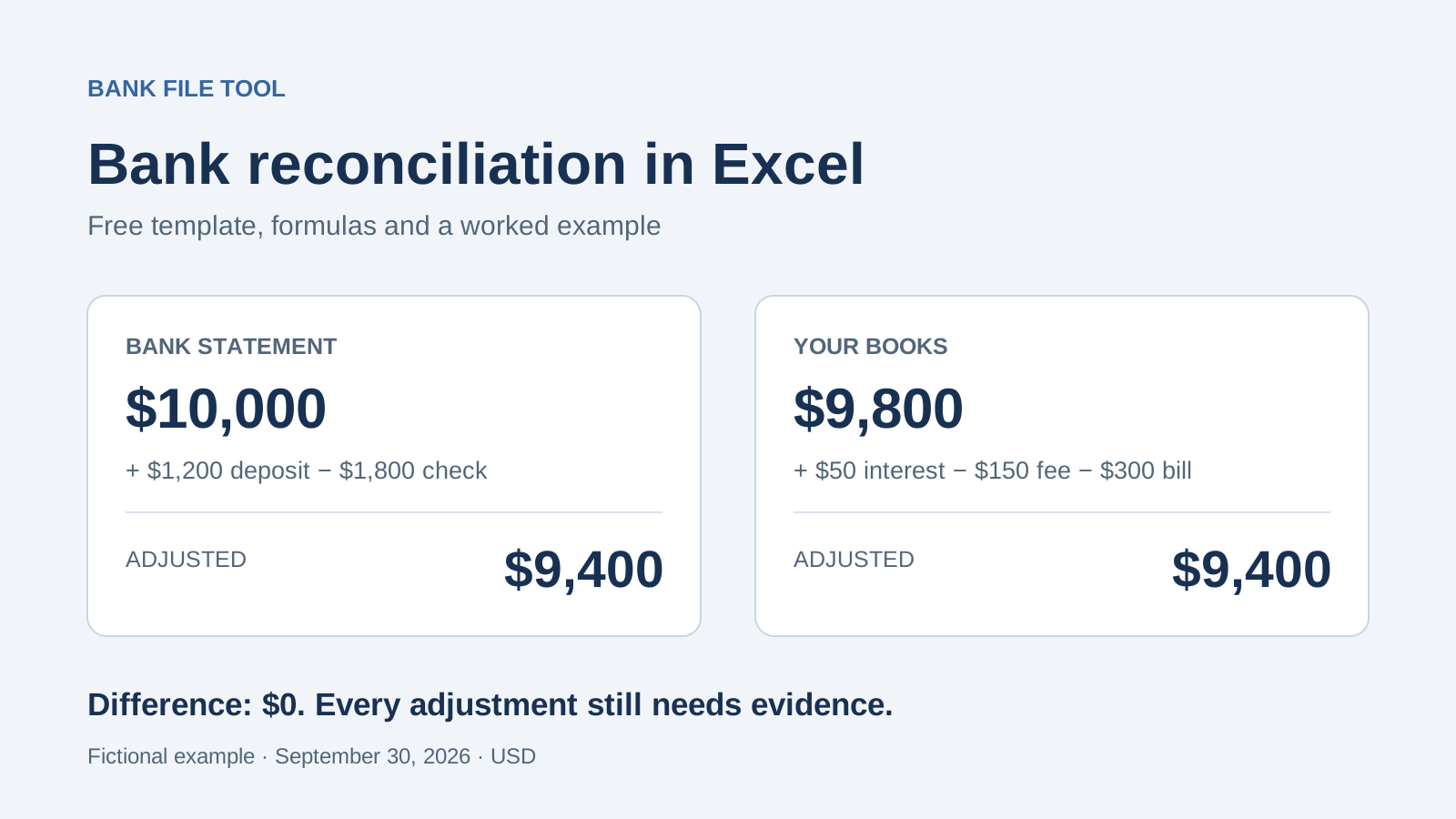
Your bank statement shows $10,000, but your books show $9,800. You open the PDF, switch back to your ledger, and start looking for a missing $200. The difficult part is finding which transactions explain the gap.
A useful bank reconciliation statement format in Excel gives you a place to compare both records and list the differences. Start with the free files below. If your bank statement is a PDF or scan, convert it to Excel with Bank File Tool so you can sort and check the transactions without retyping each row.
Both .xlsx files are available without a signup form. Each contains Reconciliation, Bank, and Books worksheets. The summary formulas total the adjustments you classify; transaction matching and accounting entries remain your responsibility.
Bank reconciliation statement format in Excel: see the finished result
A bank reconciliation explains why your bank statement and your own accounting records show different balances on the same date. Here is the finished example before we walk through the entries.
Account: fictional business bank account. Date: September 30, 2026. Currency: USD.
| Bank side | Amount | Book side | Amount |
|---|---|---|---|
| Closing bank statement balance | $10,000 | Closing book balance before adjustments | $9,800 |
| Add: deposit not yet credited by the bank | $1,200 | Add: interest missing from the books | $50 |
| Less: check not yet cleared by the bank | −$1,800 | Less: bank fee missing from the books | −$150 |
| Bank error adjustment | $0 | Less: utility payment missing from the books | −$300 |
| Adjusted bank balance | $9,400 | Adjusted book balance | $9,400 |
Unexplained difference: $0. The original $200 gap was the net effect of five items. Searching only for one $200 transaction would have missed the explanation.
This is the adjusted-bank and adjusted-book approach described in OpenStax's financial accounting textbook. All amounts, references, and transaction dates in our example are fictional.
Prepare your bank statement and books
Gather the statement, the ledger for the same bank account and cutoff date, and any unresolved items from the previous reconciliation. Use the statement's closing balance, not today's available balance, which may reflect holds or more recent activity.
If your bank already offers a usable Excel or CSV export, use it. If it only provides a PDF, Bank File Tool's bank statement converter can prepare the bank side for you:
- Upload the PDF, PNG, or JPG statement you are authorized to process.
- Review the extracted rows against the original and check any balance warnings.
- Download Excel or CSV, then copy the relevant transaction columns into the template's Bank worksheet.
Bank File Tool supports statement extraction and, when the required balances are available, checks the statement's balance arithmetic. It does not compare the upload with your company's ledger or post accounting entries. Use the Books worksheet for that separate ledger export.
In both source worksheets, enter the original opening and closing balances in B3 and B4. Keep the Books closing balance before the adjustments you are about to list. Fill in the account, date, and currency on Reconciliation.
Use positive amounts in the source worksheets' Money in and Money out columns. Keep references such as 000412 as text so Excel preserves leading zeros. Check that dates and amounts were imported correctly; 03/04 can mean March 4 or April 3.
Find the five differences in the example
The completed workbook contains the full fictional transaction lists. Both start with $8,000. Four transactions match: two receipts of $2,500 and $1,000, and two payments of $800 and $300. Those bring both records to $10,400 before the unmatched items.
Now compare the remaining entries:
| Reference | In the September bank statement | In the September books | What the supporting record shows |
|---|---|---|---|
| D-0930 | Not present | $1,200 received | Bank credited it on October 1 |
| 1048 | Not present | $1,800 paid | Check cleared on October 2 |
| INT-0930 | $50 received | Not present | September bank interest |
| FEE-0930 | $150 paid | Not present | September service fee |
| UTIL-0928 | $300 paid | Not present | September utility autopayment |
The bank's remaining entries total $50 − $150 − $300 = −$400, giving its $10,000 closing balance. The books' remaining entries total $1,200 − $1,800 = −$600, giving their $9,800 closing balance.
The October dates explain the September differences. They do not change the reconciliation date.
The $1,200 is a deposit in transit: you recorded the deposit, but the bank had not credited it by September 30. Add it to the bank side. The $1,800 is an outstanding check: you recorded the payment, but the bank had not deducted it yet. Subtract it from the bank side.
The other three items are already on the bank statement. They belong on the book side because the books are missing them.
Decide which side to adjust
Use this guide after you have checked the supporting records. An unmatched transaction is not automatically a timing difference.
| Confirmed difference | Adjustment | Why | Update the books? |
|---|---|---|---|
| Deposit recorded in books, not yet credited by bank | Add to bank side | Bank balance temporarily excludes the deposit | No, if already recorded correctly |
| Check recorded in books, not yet cleared by bank | Subtract from bank side | Bank balance still includes the money | No, if already recorded correctly |
| Bank interest absent from books | Add to book side | Books omit the receipt | Yes |
| Bank fee or authorized autopayment absent from books | Subtract from book side | Books omit the payment | Yes |
| Confirmed error in either record | Correct the affected side | Direction depends on the error | Correct book errors; follow up with the bank for bank errors |
On Reconciliation, enter one verified item per row in the adjustment table, starting at row 29. Select Bank or Books, choose the category, and record the reference and evidence.
Here, the Signed amount column uses positive numbers for additions and negative numbers for deductions. Enter -1800 for check 1048 and -150 for the fee. This differs from the source worksheets, where money in and money out have separate positive-value columns.
Post the missing interest, fee, and utility payment to your accounting system using the appropriate accounts. A customer receipt, loan, and transfer between your own accounts need different accounting treatment even though each can increase the bank balance. AccountingCoach explains which reconciliation items require journal entries.
Record posting progress in Book entry status. Preserve the original $9,800 closing book balance in this reconciliation file: the listed adjustments already take it to $9,400. Replacing it with $9,400 while keeping the adjustments would count them twice.
How the Excel reconciliation formulas work
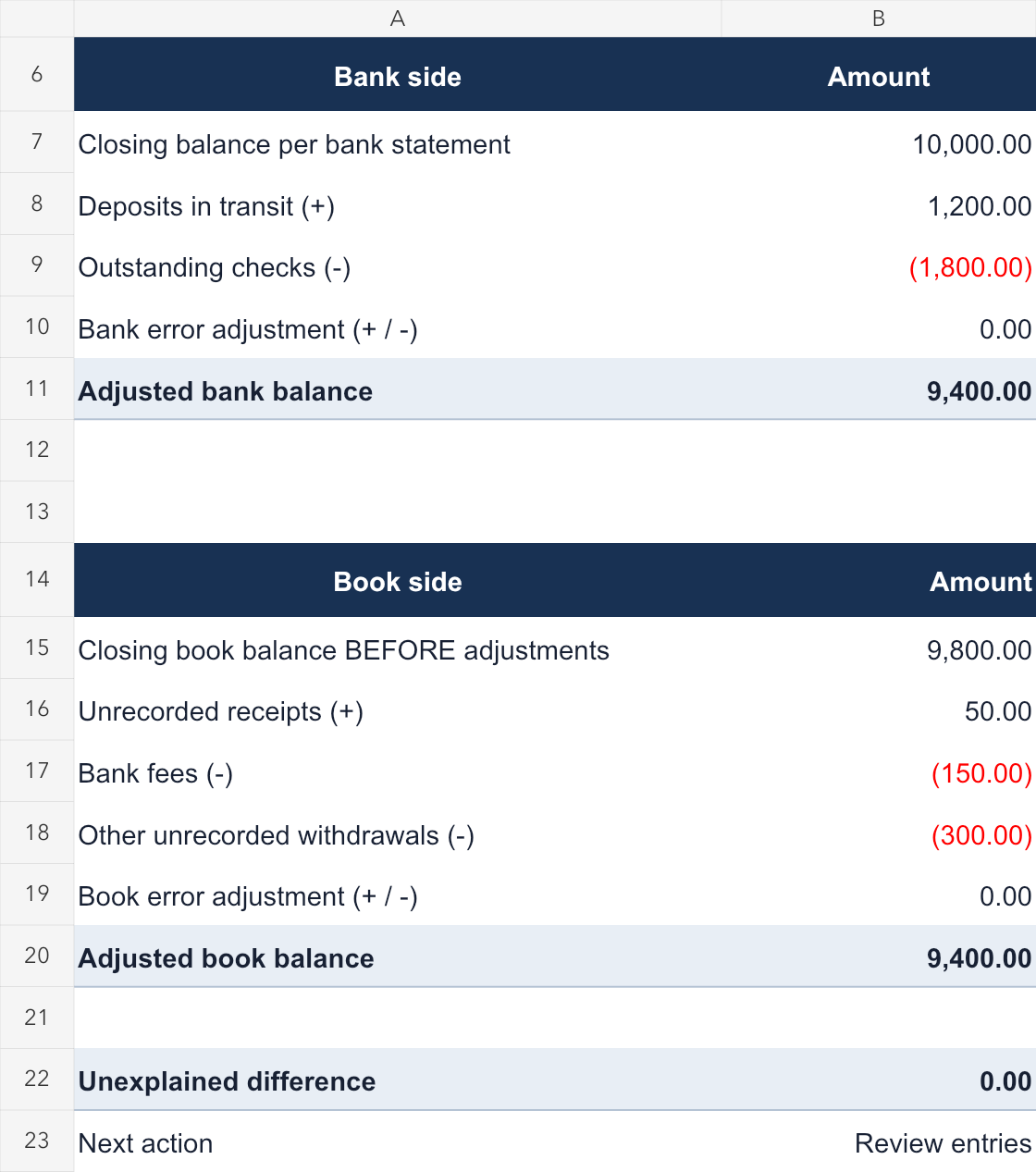
The formulas in this bank reconciliation statement format in Excel pull the two original closing balances from the source worksheets and total the classified adjustments. You do not need to copy formulas into the downloaded files.
| Summary cell | Calculation |
|---|---|
| B7 | Original closing bank balance from Bank!B4 |
| B8–B10 | Bank-side adjustment totals from the detail table |
| B11 | Original bank balance plus signed adjustments |
| B15 | Original closing book balance from Books!B4 |
| B16–B19 | Book-side adjustment totals from the detail table |
| B20 | Original book balance plus signed adjustments |
| B22 | Adjusted bank balance minus adjusted book balance |
For example, B8 totals items classified as Bank / Deposit in transit:
=SUMIFS($C$29:$C$78,$B$29:$B$78,"Bank",$D$29:$D$78,"Deposit in transit")The adjusted balances use these formulas:
=IF(ISNUMBER(B7),SUM(B7:B10),"")
=IF(ISNUMBER(B15),SUM(B15:B19),"")
The difference cell stays blank until both adjusted balances are numeric:
=IF(COUNT(B11,B20)=2,ROUND(B11-B20,2),"")The files use two decimal places and provide 50 adjustment rows, 29–78. If you extend the adjustment table, extend its summary formula ranges too. Blank starting balances do not produce a misleading zero difference. Even when the difference is zero, the next action remains Review entries.
If the balances still do not agree
Check repeated amounts by reference. Suppose your books show two $450 payments, PAY-101 and PAY-102, but the bank statement contains only PAY-101. Only that payment is matched. Investigate PAY-102 before deciding whether it is outstanding. Matching on amount alone can incorrectly mark both as complete.
Bring forward last month's open items. A September bank payment may settle a check recorded in August. Look at the previous reconciliation before adding a new payment to September's books.
Check for overlapping exports and missing rows. Importing September 30 twice creates duplicates. Missing a PDF page can omit valid transactions. For complete data from a standard deposit account, verify opening balance plus money in minus money out against the closing balance.
Document grouped transactions. If several receipts make up one bank deposit, identify the group and verify its total. Do not alter the individual amounts to force one-to-one matches.
Keep unexplained differences visible. A suspected bank error needs evidence and follow-up with the bank. Do not classify an unknown difference as a fee just to make the totals agree.
A zero difference only shows that the adjusted totals agree. An omitted $500 receipt and an omitted $500 payment can cancel each other out. Review the transactions and adjustment evidence, finish the required book entries, and retain the statement, ledger export, and reconciliation together.
Frequently asked questions
Can I use this bank reconciliation statement format in Excel for free?
Yes. The blank workbook and completed example linked above are free downloads. Bank File Tool's statement-conversion service has its own usage limits; downloading the template does not require conversion.
Can Bank File Tool complete the reconciliation for me?
It can turn your bank statement into Excel or CSV and check the statement's arithmetic when the necessary balances are available. You still need to compare that data with your books, explain unmatched transactions, and post any required corrections.
Can I reconcile using only a bank statement?
You need independent accounting records for comparison. Copying the statement into the Books sheet does not create an independent ledger.
Does the template work with an overdraft?
For a bank account recorded as an asset in your books, enter an overdrawn balance as negative and keep the same addition and deduction logic. Credit cards and other liability accounts require their own sign conventions.
Why does the template say Review entries when the difference is zero?
Matching totals do not prove that every transaction is correct. Check the evidence, review unmatched items, and finish the accounting entries before treating the reconciliation as complete.
If the slowest part of your bank reconciliation statement format in Excel workflow is copying rows from a PDF, start by converting your statement with Bank File Tool. Then use the workbook to connect each difference to a transaction and a clear explanation.
Author